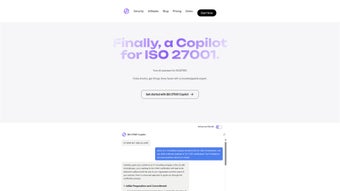

Download ISO 27001 Copilot – AI‑Powered ISO 27001 Implementation Tool
Overview – Why ISO 27001 Copilot Is a Game‑Changer for Information Security
ISO 27001 Copilot is an AI‑driven assistant that streamlines the entire lifecycle of ISO 27001 implementation. Whether you are a seasoned information‑security manager or a small‑business owner taking the first steps toward certification, the tool guides you through critical tasks such as defining the ISMS scope, conducting risk assessments, and drafting treatment plans. Its intuitive dashboard removes the intimidation factor that often accompanies ISO standards, turning a complex, document‑heavy process into a series of manageable, automated actions.
By leveraging natural‑language processing, Copilot can interpret your organization’s unique context, suggest relevant controls, and even generate draft policies that comply with both ISO 27001 and GDPR best practices. The free tier offers enough functionality to evaluate the platform, while the premium subscription unlocks unlimited document generation, advanced risk‑modeling, and priority support. In an era where data breaches cost millions, ISO 27001 Copilot provides a secure, cost‑effective pathway to demonstrate robust information‑security governance.
Beyond the core compliance workflow, the application integrates with existing GRC tools, provides real‑time KPI visualizations, and continuously updates its knowledge base to reflect the latest revisions to ISO 27001 Annex A. This ensures that every recommendation you receive is both current and actionable, helping you avoid the common pitfall of outdated controls that can jeopardize audit outcomes. For organizations that value both speed and precision, Copilot offers a unique blend of AI intelligence and security‑by‑design architecture, making the certification journey faster, cheaper, and less stressful.
Core Features, Benefits, and Real‑World Impact
The platform’s feature set is built around the four pillars of ISO 27001: scope definition, risk assessment, control selection, and documentation. Each pillar is powered by AI models trained on thousands of successful implementations, ensuring that the guidance you receive reflects industry‑proven practices. The result is a dramatic reduction in manual effort, fewer errors, and a clearer path to audit readiness. Below is a detailed list of the capabilities that set ISO 27001 Copilot apart from traditional spreadsheet‑based methods.
- AI‑guided scope definition – automatically maps business units, assets, and stakeholders.
- Dynamic risk assessment engine – evaluates threats, vulnerabilities, and impacts with real‑time data.
- Control selection wizard – recommends ISO 27001 Annex A controls tailored to your risk profile.
- Document generation suite – creates policies, procedures, and statements of applicability in minutes.
- GDPR‑compliant data handling – all user inputs are encrypted, stored locally or in a private cloud.
- Progress tracking dashboard – visual KPI meters keep your certification timeline on schedule.
- Collaboration hub – share drafts with auditors, legal teams, or external consultants securely.
- Free version with core modules – ideal for SMEs testing the waters before upgrading.
- Premium unlimited access – includes advanced analytics, multi‑project handling, and priority support.
Pros
- Reduces manual hours by up to 70 % compared with traditional spreadsheet‑based methods.
- AI suggestions stay up‑to‑date with the latest ISO 27001 revisions and security trends.
- Secure by design – end‑to‑end encryption, GDPR‑ready, no data sold to third parties.
- Scalable for both single‑site and multi‑site enterprises.
- Free tier provides genuine value, allowing organizations to test the platform risk‑free.
Cons
- Learning curve for users unfamiliar with AI‑assisted tools.
- Premium pricing may be a barrier for very small businesses with limited budgets.
- Requires stable internet connection for cloud‑based features; offline mode is limited.
- Custom integrations with existing GRC platforms are currently limited to API access.
Overall, the benefits far outweigh the drawbacks for most organizations that are serious about achieving ISO 27001 certification efficiently. By automating repetitive tasks and providing a clear, AI‑curated roadmap, Copilot enables security teams to focus on strategic risk mitigation rather than getting bogged down in paperwork.
Installation, Compatibility, and Step‑by‑Step Usage Guide
ISO 27001 Copilot is offered as a cross‑platform web application, meaning there is no traditional “install” process for desktop operating systems. To get started, simply visit the official download page, create a free account, and choose between the cloud‑hosted version or the self‑hosted Docker container for on‑premises deployment. Both options are designed with security and ease‑of‑use in mind, ensuring you can begin your certification journey within minutes.
System Requirements (itemprop="operatingSystem")
- Windows 10 or later, macOS 11 (Big Sur) or later, Linux distributions with Docker support.
- Modern browsers: Chrome ≥ 90, Edge ≥ 90, Firefox ≥ 88, Safari ≥ 14.
- Minimum 4 GB RAM and 2 CPU cores for the Docker container; cloud version runs entirely on the provider’s infrastructure.
Getting Started in Five Simple Steps
- Create an account: Register with a corporate email to unlock the free tier. Verification is completed within minutes.
- Define your ISMS scope: Use the AI wizard to map locations, processes, and information assets. The assistant asks contextual questions to build a comprehensive scope map.
- Run the risk assessment: Upload asset inventories or let Copilot import them from supported GRC tools. The AI evaluates likelihood and impact, presenting a risk heat‑map.
- Select controls and generate documentation: Based on the risk results, the tool suggests Annex A controls. With a single click, policies, procedures, and a Statement of Applicability are drafted.
- Review, collaborate, and submit: Invite auditors or internal stakeholders via the collaboration hub. Track changes, approve final documents, and export to PDF or XML for submission to certification bodies.
For organizations that require on‑premises deployment, download the Docker image from the official repository, run docker pull isocoprilot/app, and follow the setup wizard to configure TLS certificates and database connections. The wizard also guides you through enabling automatic updates for the AI model, which ensures the knowledge base stays current without manual intervention. Detailed guides are available in the Help Center, and the community forum provides quick solutions for common setup questions. Both cloud and self‑hosted versions support single sign‑on (SSO) via SAML or OAuth, allowing seamless integration with existing identity providers and preserving your organization’s authentication policies.
Conclusion, Frequently Asked Questions, and Call to Action
ISO 27001 Copilot bridges the gap between ambitious security goals and practical implementation. By automating the most time‑consuming parts of the certification journey—scope definition, risk analysis, control selection, and documentation—organizations can focus on strategic improvements rather than paperwork. The AI backbone keeps recommendations aligned with the latest standards, while robust security controls protect the very data you are trying to safeguard.
Whether you opt for the free version to explore the platform or upgrade to premium for unlimited projects, Copilot delivers a measurable boost in efficiency, compliance confidence, and overall information‑security posture. In addition, the platform’s built‑in analytics let you monitor progress against key performance indicators, making it easier to report ROI to senior management and justify further investment in security initiatives. For companies operating in regulated industries, the combination of GDPR‑ready data handling and audit‑grade documentation provides peace of mind that the compliance journey will not expose new risks.
Frequently Asked Questions
Can I use ISO 27001 Copilot for multiple projects simultaneously?
Yes. The premium subscription allows unlimited concurrent projects, each with its own scope, risk register, and documentation set. Free users can manage up to two active projects.
How does Copilot ensure GDPR compliance for my data?
All user inputs are encrypted at rest and in transit. The platform does not store personal data beyond what is necessary for the ISMS, and it provides data‑deletion tools to meet GDPR’s right‑to‑be‑forgotten requirements.
Is there an offline mode for highly regulated environments?
A self‑hosted Docker deployment can operate entirely offline after the initial image download. However, AI model updates require an internet connection; you can schedule periodic updates during maintenance windows.
What support options are available for premium users?
Premium subscribers receive 24/7 chat support, a dedicated account manager, and priority handling of feature requests. Free users have access to community forums and a knowledge base.
Can ISO 27001 Copilot integrate with existing GRC tools?
Yes. Copilot offers RESTful APIs and pre‑built connectors for popular GRC platforms such as ServiceNow, RSA Archer, and MetricStream, allowing seamless data exchange.
Ready to accelerate your ISO 27001 journey? Download ISO 27001 Copilot now and experience a faster, more secure path to certification. Start with the free version, explore the AI‑driven features, and upgrade whenever you need unlimited capacity and premium assistance.



.png)



